Welcome aboard. Once you’ve completed Part #1 and Part #2, you’ll be ready to connect ACARS in Part #3 and start flying.
Part #1 — Website “Get Started” + FSUIPC7
- Log on to the website and go to Flight Bag.
- Scroll down on the left side and find the “Get Started” section.
- Update your FSUIPC7: https://www.fsuipc.com/
Part #2 — Download and create your ACARS shortcut
- Create a new folder in Documents and name it:
Ehops 7 Acars
- Download phpVMS7 ACARS to that folder and extract all files.
- Open the
Ehops 7 Acars folder and find the blue Acars.exe icon.
- Create a desktop shortcut:
- Windows 10: Right click Acars.exe → Send to → Desktop
- Windows 11: Right click Acars.exe → Show more options → Send to → Desktop
- You now have a shortcut to our ACARS tracking system.
Part #3 — Connect ACARS (API Key + URL) and fly
- Log on to the website and go to Flight Bag.
- Scroll down on the left side and find the “Get Started” section.
- Highlight and copy your API Key.
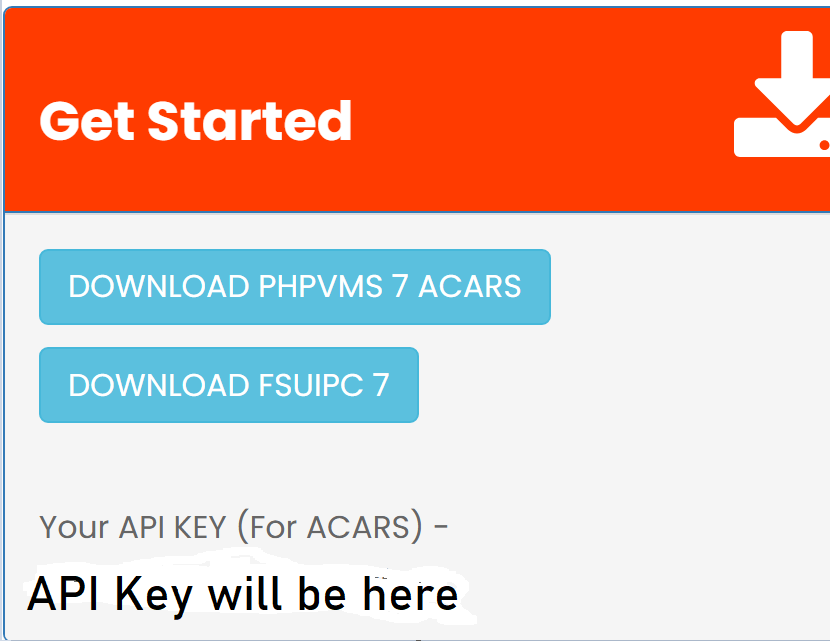
Screenshot: Copy your API Key from
Flight Bag →
Get Started.
ACARS settings
- From your desktop, open the ACARS tracking system.
- Set the phpVMS URL to:
https://pilot.easternhops.com
- Paste your API Key into the appropriate field (as shown in the screenshots).

Screenshot: ACARS Settings — enter the phpVMS URL and your API Key.
Screenshot: Example of ACARS connected / running.
During the flight
- When you start your flight, you will see your flight path.
- Check landing rate: confirm your landing rate was
-450 or below.

Screenshot: Landing rate must be
-450 or below.
End the flight + file the report
- When you’re done with your flight, click the file report icon.
- Click End Flight.

Screenshot: File the report when your flight is complete.

Screenshot: Click
End Flight to finish and file your flight.
Important: Be sure your landing rate was -450 or below. If not, exit the app and redo the flight — otherwise it may be rejected.
You’re done and ready for the next flight!
Need help?
If you need help setting up our VA ACARS Tracking System, join us on Discord.
Quick info
phpVMS URL:
https://pilot.easternhops.com
Where to get API Key:
Flight Bag → Get Started
Landing rate rule:
Must be -450 or below


 EasternHops VA Site